Integration reference

The HighLevel integration, layer by layer.

HighLevel, also known as GoHighLevel or GHL, is where many clinics keep their contacts, pipelines, calendars and inbox. HL Patient Portal connects to one sub-account per clinic with a single OAuth click, then works in four layers: a panel beside the contact, workflow triggers and an action, opportunity sync, and custom fields on the contact. This page is the reference for what each layer does. The portal also runs without HighLevel.

The whole connection on every plan · Connect in one click · Disconnect any time and your data stays

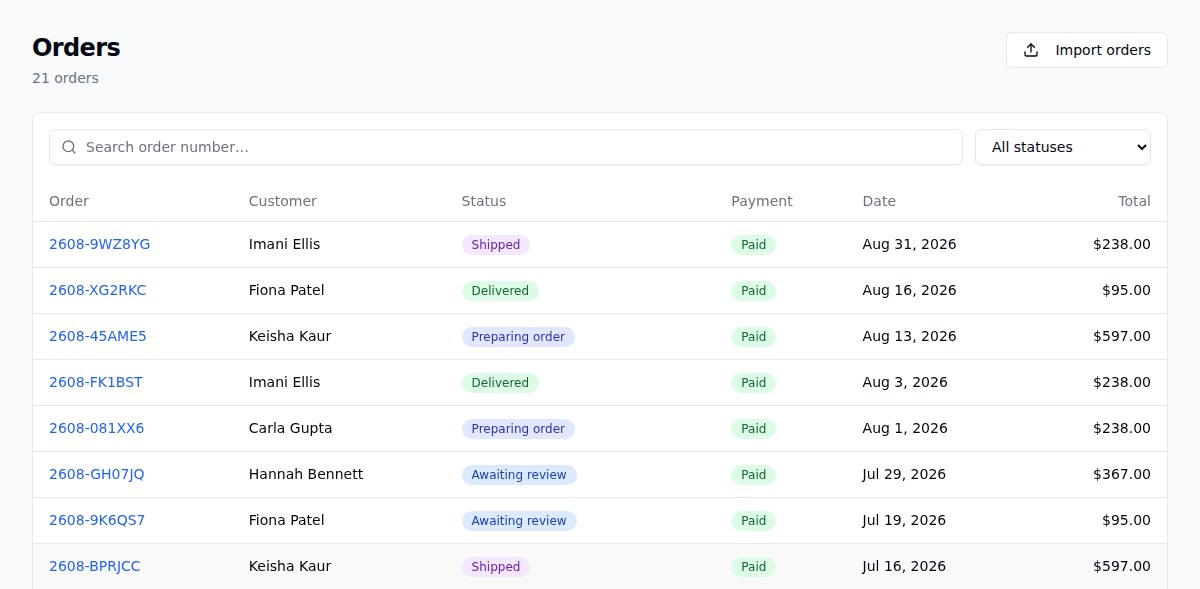
The order queue in the clinic dashboard: the contact panel in HighLevel works the same orders with the same statuses
What the connection does

What does connecting HighLevel change?

Trigger catalog

Which workflow triggers does the portal fire?

Each trigger is a HighLevel workflow trigger from our marketplace app. Every delivery carries the trigger key, a timestamp, your location id, the clinic name and a data object with the HighLevel contact id, the patient's first name, last name and email, and the event's own details. Swipe the table sideways on a phone.

Trigger keyFires whenExample automation
injection_missedA scheduled dose passed yesterday without being logged or skipped. Checked daily at 11:00, once per dose. The payload names the product and the scheduled date.Wait two hours, then text: "Life happens! Ready to get back on track? Book a check-in: {{link}}".
streak_brokenA patient with three or more logged doses has fallen to a zero-week streak. Once per patient per week. The payload carries the total shots and the last dose date.Add the contact to a re-engagement campaign and notify the care team.
order_status_changedAny order status transition, whether it came from the dashboard, the HighLevel panel or the carrier tracking sync. Once per order and status. The payload carries the order number, status, total, tracking number and items.If status is shipped, text the tracking number in your own words.
achievement_unlockedAny achievement is awarded: weight milestones, shot milestones, streaks. Once per achievement. The payload carries the type, name, value and badge.If value is 50, send a congratulations email and ask for a review.

Five more events fire the same way and can be subscribed from a workflow: reward_earned when the rewards program awards store credit, provider_review_flagged when an intake or check-in answer needs a provider's eyes, order_created, patient_created and message_received. Deliveries go only to HighLevel-owned hosts, a subscription switches itself off after 20 consecutive failed deliveries, and every event also applies an event:<key> tag to the contact when the Trigger workflows toggle is on, so a tag-based workflow works with no marketplace trigger at all.

The four layers

What are the four layers of the integration?

Each one works on its own. A clinic that only wants contacts and payments in HighLevel gets that from the connection alone.

1

The contact panel

A page from our marketplace app embedded as a custom page or tab beside the contact. It shows the linked patient's orders with Confirm, Approve, Mark shipped, In transit, Out for delivery, Mark delivered and Cancel, a field for the tracking number, a tracking summary (shots logged, streak, last dose, suggested next site, recent weigh-ins) and active treatments. Changes land in the same order history the dashboard uses, stamped with the HighLevel user who made them. A Copy reorder link button builds a link to the product from the patient's last order and leaves a note on the contact saying who shared it. Opened without a contact, the panel shows a patient search instead.

2

Workflow triggers and the invite action

The triggers in the table above let a workflow react to what happens in the portal. The Invite to patient portal action lets a workflow make something happen in it: it creates the contact's portal account, passwordless, and sends the claim link by email, by text from your HighLevel number, or both, exactly as the dashboard's Add patient does. The reply carries a status the workflow can branch on: invited, resent, already_invited, already_claimed, invalid (no usable email, or no first or last name), locked (the clinic has not finished go-live), blocked (the plan is at its patient limit) or failed. The claim link is in the reply too, so a text step can send it in your own words.

3

Opportunity sync

An order created with a HighLevel opportunity moves that opportunity on its own: won when the order is delivered, lost when it is cancelled or refunded. Nothing to configure beyond the connection.

4

Custom fields on the contact

After a dose or a weigh-in is logged, five fields on the contact are refreshed, at most once every 30 minutes per patient: portal_total_shots, portal_streak_weeks, portal_last_injection_date, portal_last_weight and portal_shots_30d. The fields are created on the location the first time they are needed. A smart list such as "portal_shots_30d is less than 2 and tag is active-patient" is then an ordinary HighLevel filter.

Also in the connection

What else syncs between the portal and HighLevel?

1

Contacts and tags

With Sync contacts on, a patient who signs up becomes a contact in your location, tagged active-patient, plus new-patient on their first sync. If you already have a contact with the same email, the patient is linked to it once they have confirmed that email. A contact that only shares the phone number is never linked or changed.

2

Orders as payments

With Sync orders on, each order is posted to the contact as a payment with the order number and the items, so what a patient has paid shows on the contact.

3

Live chat in Conversations

On every plan, including the trial, the chat bubble in the portal is wired to your Conversations inbox. Patient messages arrive as their own channel and your replies go straight back to the patient.

4

Texts from your own number

Account invites sent by text go out through your HighLevel number, with its opt-outs and registration. The portal never sends SMS itself.

5

Calendars for in-office visits

A product set to in-office fulfillment takes a booking calendar link, such as your HighLevel calendar. Right after paying, the patient is sent there to book the visit, and the order sits in the same queue as shipped products.

6

Rewards from tags and pipelines

The rewards program can award store credit when a tag is added to the contact or an opportunity reaches a stage or is won. A workflow with a webhook step tells the portal; every award fires reward_earned back.

Connecting

How do you connect a HighLevel sub-account?

One OAuth flow per clinic, started from the clinic's dashboard. There is nothing to install in the sub-account for the sync, the triggers or the fields.

Click Connect HighLevel

In the dashboard, open Integrations and click Connect HighLevel on the HighLevel card. Start here, not from the HighLevel marketplace: an install started inside HighLevel cannot tell which clinic to link.

Choose the location

You are sent to HighLevel's choose-location screen. Sign in, pick the sub-account for this clinic and approve access to contacts, opportunities and conversations. Tokens are stored encrypted, per clinic.

Check the card

Back in the dashboard the card shows a green Connected badge with the location name and three toggles, all on: Sync contacts, Sync orders, Trigger workflows. If it still says not connected, click Verify connection.

Worked examples

How would a clinic build automations on these events?

Three workflows written out the way a clinic would build them in HighLevel, step by step, with our trigger or action as the first block. The wording of every message is yours.

Win-back after a missed dose

Trigger: injection_missed. Wait: two hours, so a patient who simply logged late is not nagged. SMS: "Life happens! Ready to get back on track? Book a check-in: {{link}}" with your calendar link. Wait: two days. Condition: if portal_last_injection_date on the contact has not changed, add a task for the care team to call. A dose logged in the app refreshes the field, so a patient who caught up drops out of the branch on their own.

Shipping text with the tracking number

Trigger: order_status_changed. Condition: status equals shipped. SMS: "{{contact.first_name}}, your order is on its way. Track it here: {{tracking_number}}" using the tracking number from the payload. The portal already emails the patient at each status from your templates; this text is the extra touch in your own voice. Add a second branch for delivered that asks how the first week went.

Invite from the pipeline

Trigger: the contact is tagged new-patient, or the opportunity reaches your "Consult done" stage. Action: Invite to patient portal, email on, text on if you want the link from your own number. Condition: if status equals invited, wait two days; if portal_total_shots on the contact is still empty, text "Need a hand setting up your portal? Reply here." If status equals already_claimed, do nothing. If status equals invalid, add a task to fix the contact's email or name.

What every payload carries

Each delivery is a JSON object with the trigger key, a timestamp, your location id, the clinic name and a data object. The data always includes the HighLevel contact id and the patient's first name, last name and email, then the event's own fields: product and scheduled date for a missed dose, order number, status, total, tracking number and items for an order, type, name, value and badge for an achievement, total shots and last dose date for a broken streak. Map them once from the sample payload and reuse them in any step.

Questions

What buyers ask about the HighLevel integration

Do I need HighLevel to use HL Patient Portal?

No. The portal runs on its own: patient app, shop and order queue, dose and weight tracking, messaging to the dashboard inbox, reminders, rewards, forms and the at-risk list are all built in. Connecting HighLevel adds the four layers on this page. If you disconnect, the sync stops and your patients and orders stay in the portal.

Does each clinic have to install something in its sub-account?

No. The per-clinic requirement is the OAuth connection made from the dashboard. Contact sync, payments, triggers, the invite action and custom fields all use that connection. The contact panel is a page from our marketplace app, and it maps the sub-account to the clinic on its own; a patient appears in it once their portal account is linked to a contact, which the contact sync does.

Where do the trigger payloads go, and who can subscribe?

Only to delivery addresses on HighLevel-owned domains; a subscription pointing anywhere else is refused. A subscription is tied to the clinic whose sub-account created it, and a workflow that stops accepting deliveries is switched off after 20 consecutive failures. Each event is delivered at most once, even when a detection job re-runs.

What does the Invite to patient portal action cost?

Nothing from us. Workflow actions from marketplace apps are part of HighLevel's premium triggers and actions, which HighLevel bills to the sub-account per execution. The action only appears in sub-accounts that have the app installed. Inviting patients from the dashboard or importing a list does not use it.

Which plan includes which part?

All of it is on every plan, including Starter: contact and payment sync, workflow triggers, the invite action, custom fields, opportunity sync and the contact panel. Live chat into Conversations is on every plan, including the trial. A custom domain and API access are Growth and up. See pricing for the full table.

Does the connection work with a white-labeled HighLevel or an agency account?

Yes. Each clinic connects its own sub-account, and the contact panel loads inside any HighLevel domain, including an agency's white-label domain. An agency running several clinics connects each one's sub-account from that clinic's dashboard; see the agency page.
Connect your location in one click.

From $199/month · 14 days free · No card to start

Also see: Patient portal for HighLevel clinics · For HighLevel agencies · Help: connecting HighLevel · Pricing